Pool service app for techs
Your techs hold the test kit up to the screen, tap the matching color and get the water balance and the exact dose. Then the checklist, photos and finish. In a dead zone it all saves on the phone.
The demo runs a sample route in your browser. No account.
A pool stop in five steps
Every stop runs the same way for every tech, so a new hire does it right on day one.
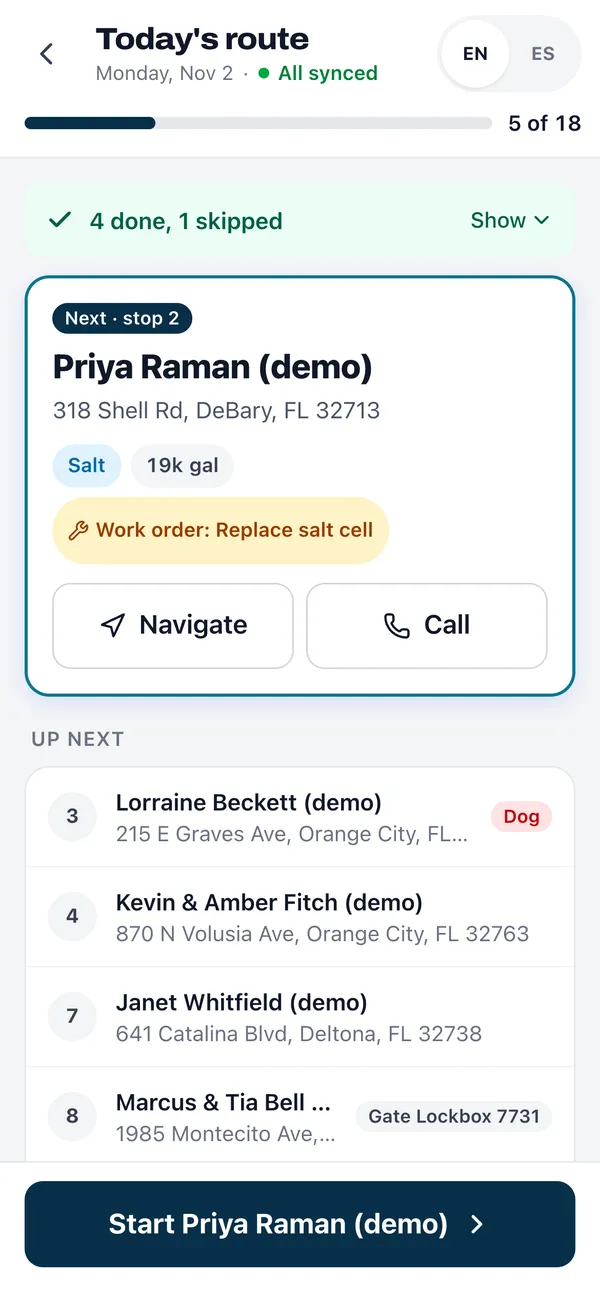
Arrive
Gate code, dog warning, access notes and the office's pinned note sit at the top. Directions open Apple Maps on an iPhone and Google Maps elsewhere.
Read the water
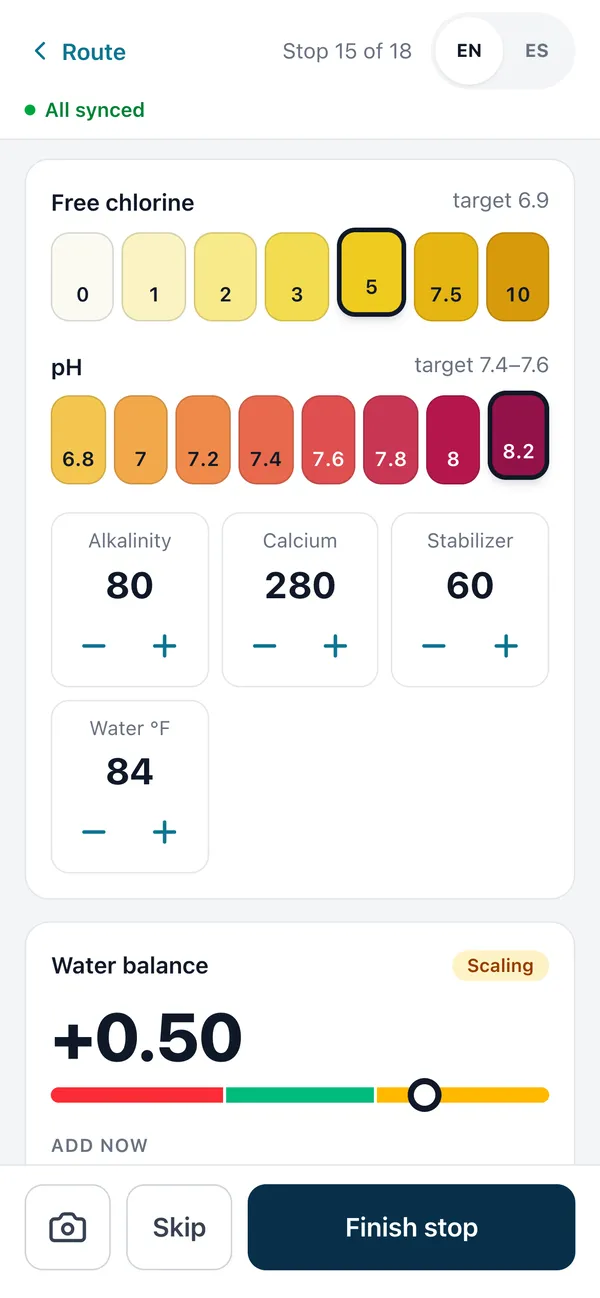
Tap the color for chlorine and pH, nudge the rest. Readings start from last visit.
Dose
LSI and the dose update as the tech taps, sized to that pool's gallons.
Service
Tick the checklist, add photos and a note for the office.
Finish
The stop saves on the phone and syncs. Time on site is recorded.
Water readings by tapping the test-kit color
Free chlorine and pH are a row of colored swatches that match a standard test kit. The tech taps the one that matches. Alkalinity, calcium hardness, stabilizer and water temperature are steppers. Everything starts from the last reading at that pool, so a steady pool is a few taps.
As the numbers change, the app works out the Langelier Saturation Index and says corrosive, balanced or scaling. Below it, the doses: chlorine to reach a target set by the stabilizer level, plus baking soda, calcium, stabilizer, soda ash or acid, each sized to that pool's gallons. More on the math on the pool chemical tracking page.
Checklist, photos and skips
Your company checklist shows on every stop, in English and Spanish. Out of the box it is skim, brush, vacuum, empty baskets, check filter pressure and check equipment; change it in settings. Photos come from the camera or the gallery and are shrunk on the phone so they upload fast on weak signal.
Work orders can mark steps as required or photo required, and the tech can't finish until those are done. A stop the tech can't service gets skipped with a reason, so the office can reschedule it.
- Gate locked
- Dog out
- Customer asked to skip
- Weather
- No access
- Other, with a note
Offline outbox
Each stop is written to the phone before the screen says done. A badge shows what is waiting. When signal returns it syncs, and resending never creates a duplicate. Work orders and the parts list work the same way.
English and Spanish
Every screen, button and checklist item in both languages. Each tech chooses on their own phone. Reports to customers read the same either way.
Prices stay in the office
Techs never see chemical cost, customer rates or work order prices. Owners and office staff see cost against rate on the same screen.
Installable pool tech app for any phone
Techs open the app in the phone's browser and add it to the home screen, where it opens full screen with its own icon. Any phone works, Android or iPhone. Updates arrive on their own, so every tech is on the same version the next time they open it.
How it compares
Skimmer, a trademark of its owner, puts its LSI and dosing calculator, powered by Orenda, on the Scaling Up plan at $2 per pool a month with a $98 minimum (checked Nov 2, 2026). In ShockRoute, LSI and doses are on every plan, including free. Read ShockRoute vs Skimmer.
Frequently asked questions
Does the pool tech app work without cell signal?
Yes. The day's route is saved on the phone, and every finished stop, skip, photo and work order goes into an outbox on the device first. The app shows how many stops are waiting and sends them when signal comes back. Sending twice never makes a duplicate.
Which readings can techs enter by color?
Free chlorine and pH are entered by tapping the swatch that matches the test kit. Alkalinity, calcium hardness, stabilizer and water temperature use plus and minus steppers. Every value starts from the pool's last reading, so most stops take a few taps.
Is the app in Spanish?
Yes. Each tech picks English or Spanish in the app and it remembers the choice on that phone. Your checklist items have a Spanish label too, and the office and customer reports still read the same no matter which language the tech used.
Can techs see what customers pay?
No. Techs see the route, gate codes, notes, readings and what to add. Chemical cost per stop, the customer's monthly rate and work order prices are hidden from the tech role. Owners and office staff can still see them.
Do techs need to download anything?
No download is required. The tech app runs in the phone's browser and can be added to the home screen, where it opens full screen like any other app.
Can I try it before signing up?
Yes. The demo runs a sample four-stop route in your browser with no account, so you can tap through readings, doses and the checklist yourself.
Hand your techs a better app tomorrow.
Free up to 10 pools. No card needed.