Pool route software
Plan the week on one board. Drag stops between techs, see when each truck gets to each pool, and let ShockRoute find a shorter order before anyone leaves the yard.
Free up to 10 pools. The optimizer is on every plan.
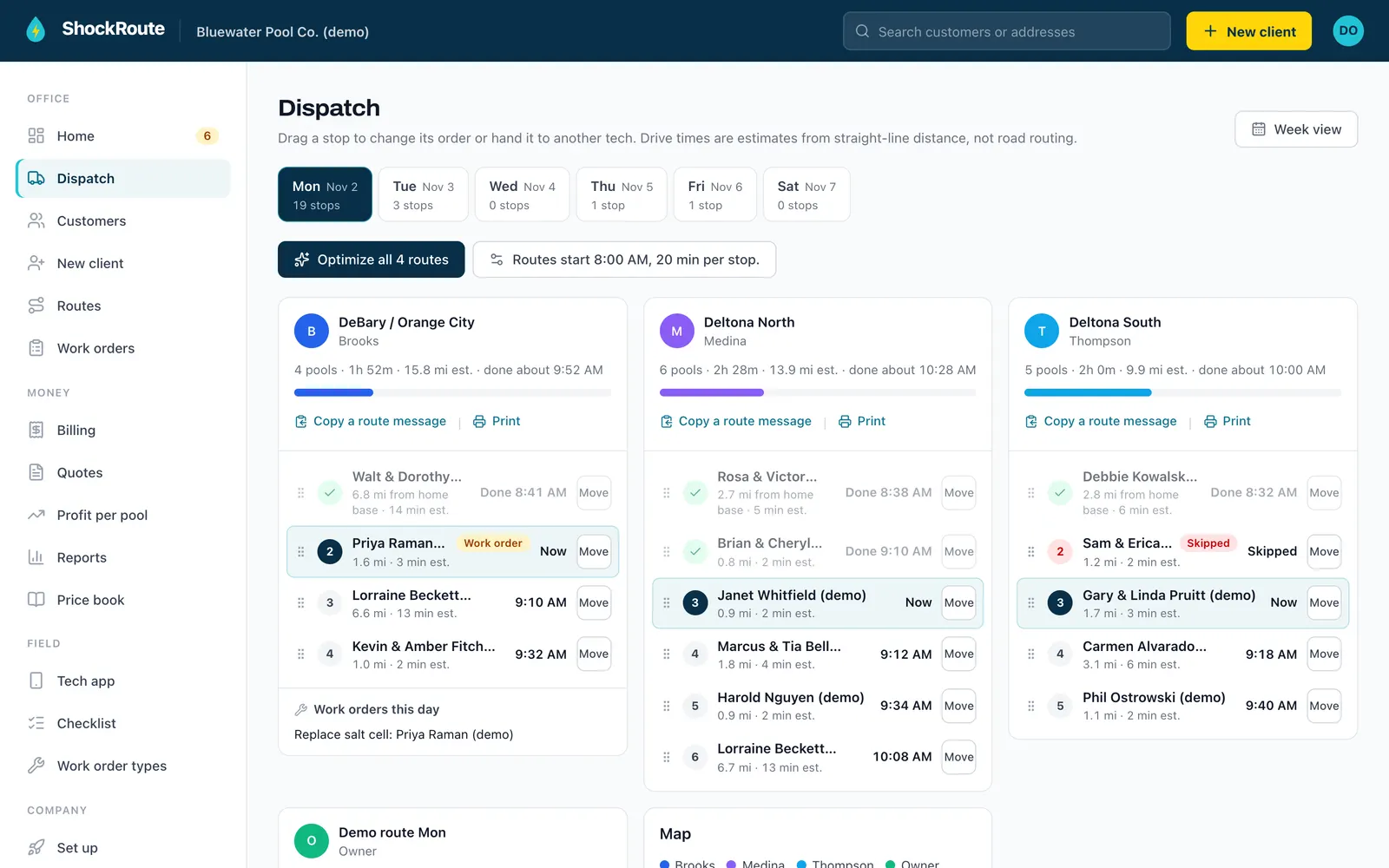
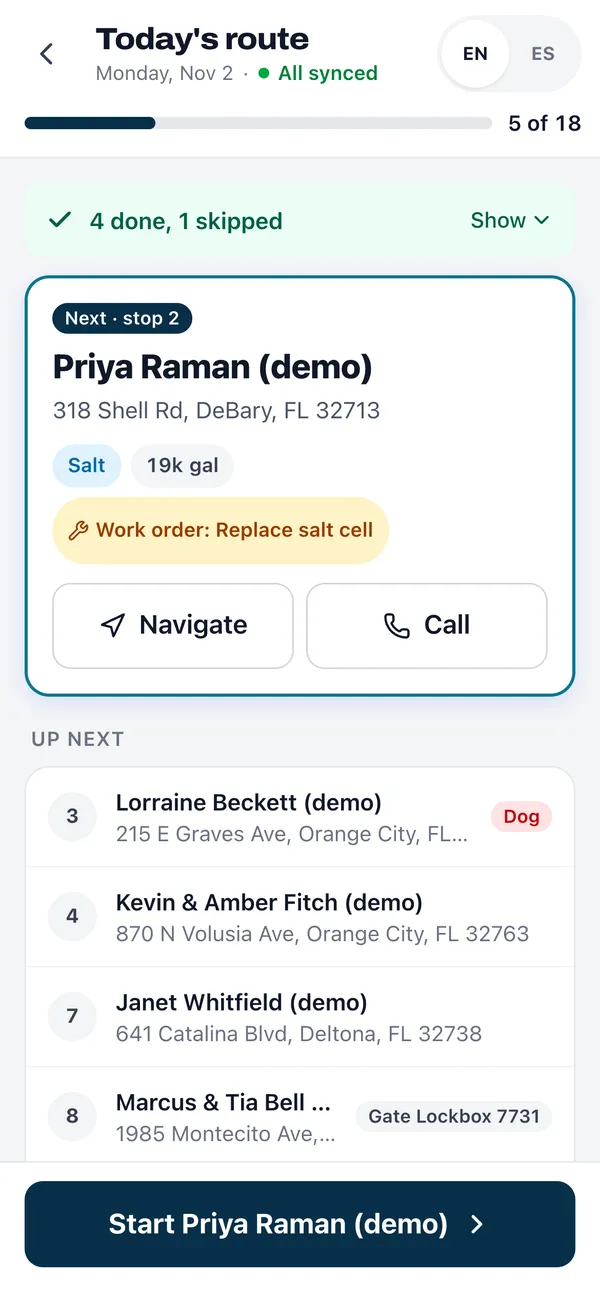
Dispatch day board
The board shows Monday through Saturday of the week you are planning. Pick a day and every route that runs that day sits side by side, one column per tech, with that day's work orders on the same screen.
Drag a stop to reorder it, or drop it on another tech's route to hand it over. On a phone, each stop has a move button instead. Both routes recalculate their arrival times and total miles as soon as you let go.
Estimated arrival times
Set when routes start and how long a stop takes. ShockRoute drives the stops in order from your home base and gives each one an estimated arrival, so you can tell a customer when to expect the truck.
Best fit for new work
New customers and open work orders wait in a list under the board. For each one, ShockRoute checks every slot on every route that day and shows the one that adds the fewest miles, such as "Best: Tuesday south, stop 4, +1.8 mi est." One tap puts it there.
Route optimizer for shortest stop order
Open a route and ask for a shorter order. The optimizer starts at your home base, takes the nearest stop next, then keeps swapping stops until no swap shortens the day. You see the miles now, the suggested miles and the difference before you apply it, and nothing changes until you do.
There is no stop cap and no higher plan to unlock it. Distances are straight-line estimates with a road factor, which is plenty to catch a route that zigzags across town.
Now
41.2 mi
Suggested
33.9 mi
Saves
7.3 mi
Service frequency and route days
A route is a name, a weekday and a tech. Each stop on it is weekly, every two weeks or monthly. ShockRoute builds the day's visits from those rules, so an every-two-weeks pool only shows up on its week and a snowbird who paused service drops off until their return date.
- Weekly, every two weeks or monthly per stop
- Pause a customer with a return date
- Map of each route with every stop pinned
- Print a route sheet or copy the day's route message for a tech
Reschedule skipped stops
When a tech can't get in, the app asks why: gate locked, dog out, customer asked, weather, no access or something else, with an optional note and photo. The office sees every skip from the past week in one list and moves it to a new day with a date picker. Nothing falls through because someone forgot to call.
Techs run the route from the pool tech app, which keeps working without signal. Readings and doses from each stop feed the chemical tracking.
How it compares
Skimmer, a trademark of its owner, lists its route optimizer on the Scaling Up plan with a 25-stop limit (checked Nov 2, 2026). ShockRoute includes the optimizer on every plan with no stop limit, and the day board lets you drag a stop from one tech to another. See the full ShockRoute vs Skimmer comparison.
Frequently asked questions
How does the route optimizer pick the stop order?
It starts at your home base, visits the nearest stop next, then keeps swapping pairs of stops until no swap makes the day shorter. You see the current miles, the suggested miles and what you save before you apply it. Distances are straight-line estimates with a road factor, not turn-by-turn directions.
Is there a limit on stops per route?
No. The optimizer works on any route with at least three stops on the map, on every plan, including the free one.
Can I move a stop from one tech to another?
Yes. On the day board, drag the stop onto another route that runs that day, or tap its move button on a phone. Arrival times on both routes update right away.
How are arrival times worked out?
You set when routes start and how many minutes a stop takes. ShockRoute adds estimated drive time between stops in order from your home base, so each stop gets an estimated arrival. Every drive figure is labeled as an estimate.
Which service frequencies are supported?
Weekly, every two weeks and monthly. Every-two-weeks stops run on alternate weeks and monthly stops run on their route day in the first week of the month. Paused customers drop off the board until they come back.
What happens when a tech skips a stop?
The tech picks a reason, such as gate locked or dog out, and can add a note and a photo. The stop shows up in the office's Needs you list with a date picker, so you can put it on another day in one tap.
Plan next week in one sitting.
Free up to 10 pools. No card needed.